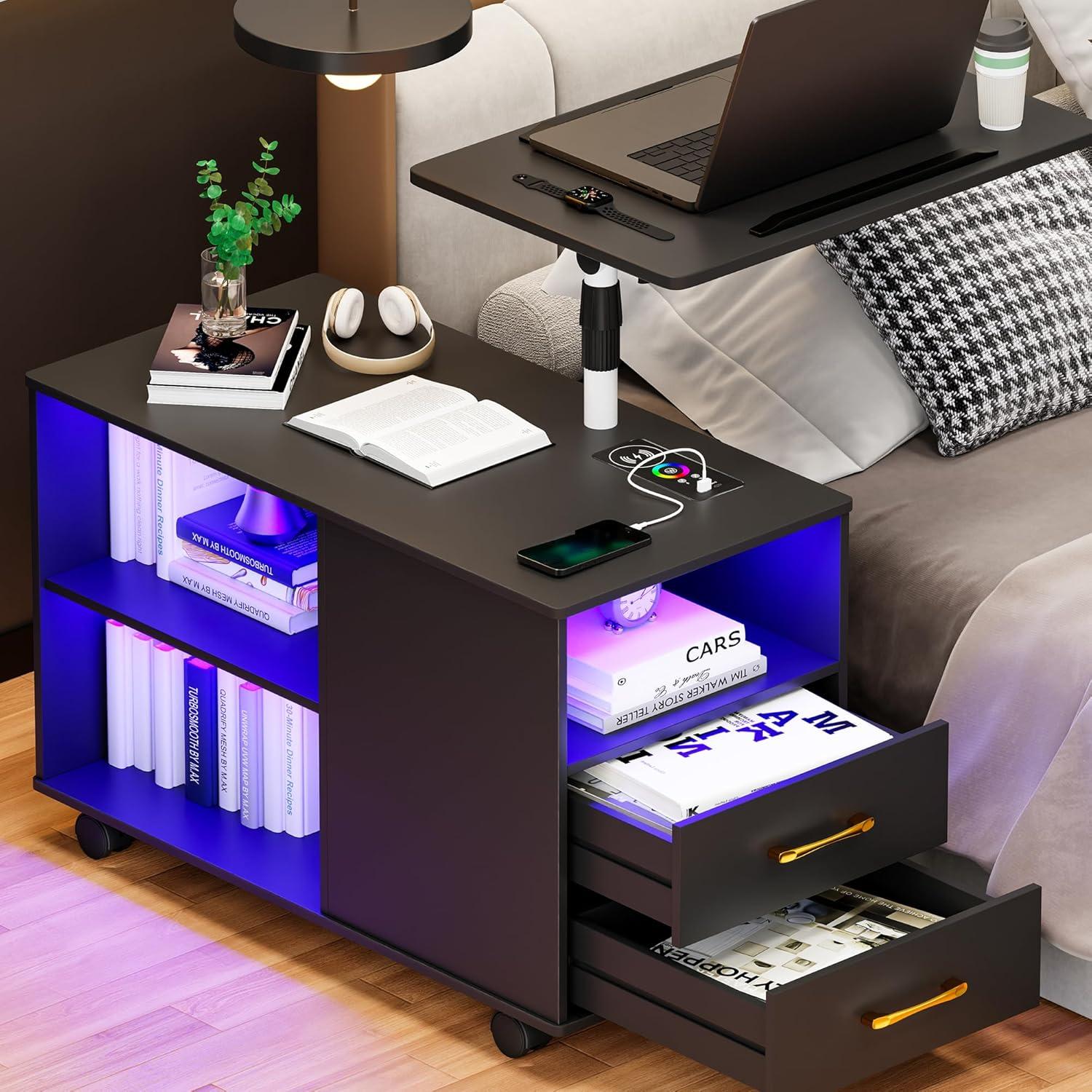
Gurexl 360° LED Nightstand — how it fits your night routine
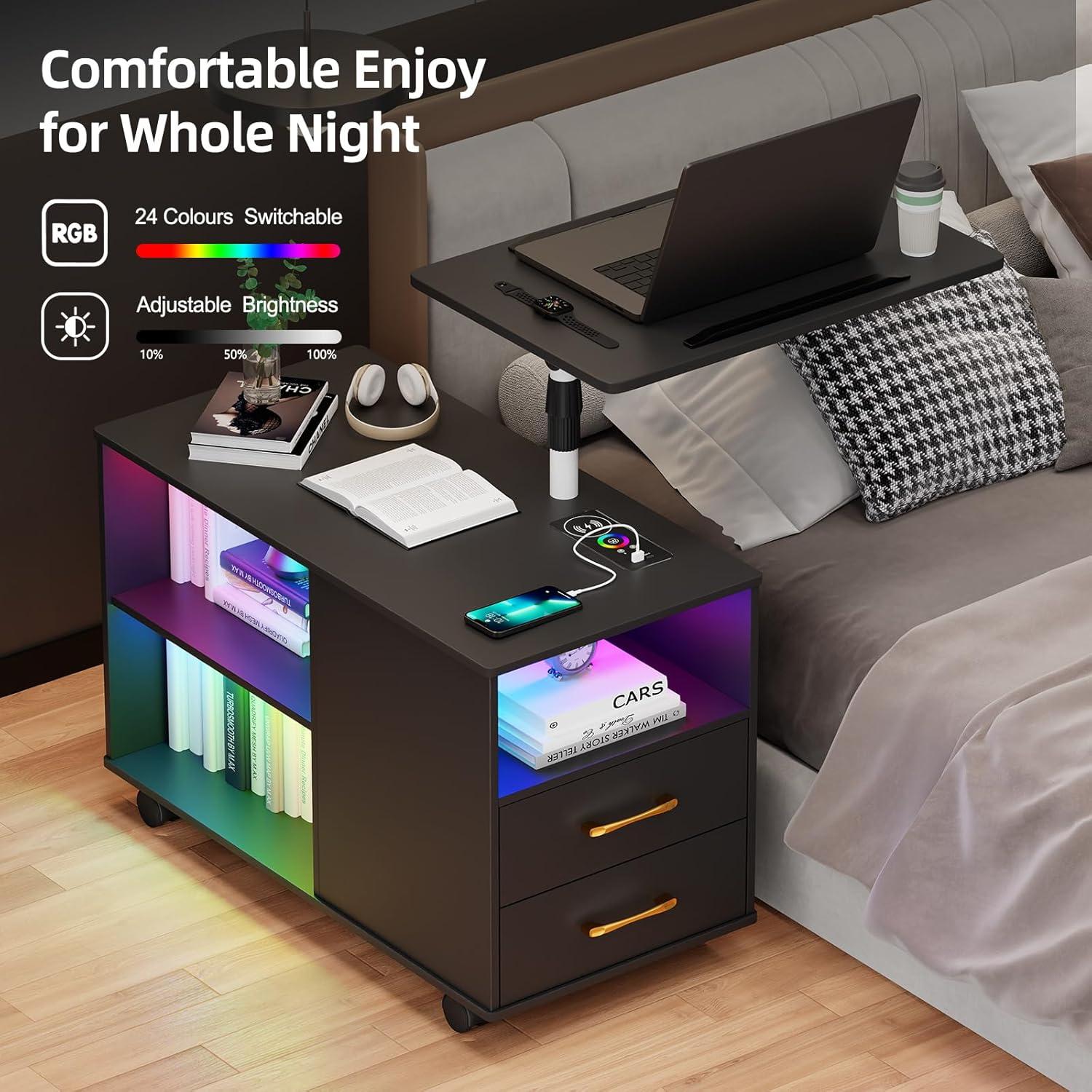
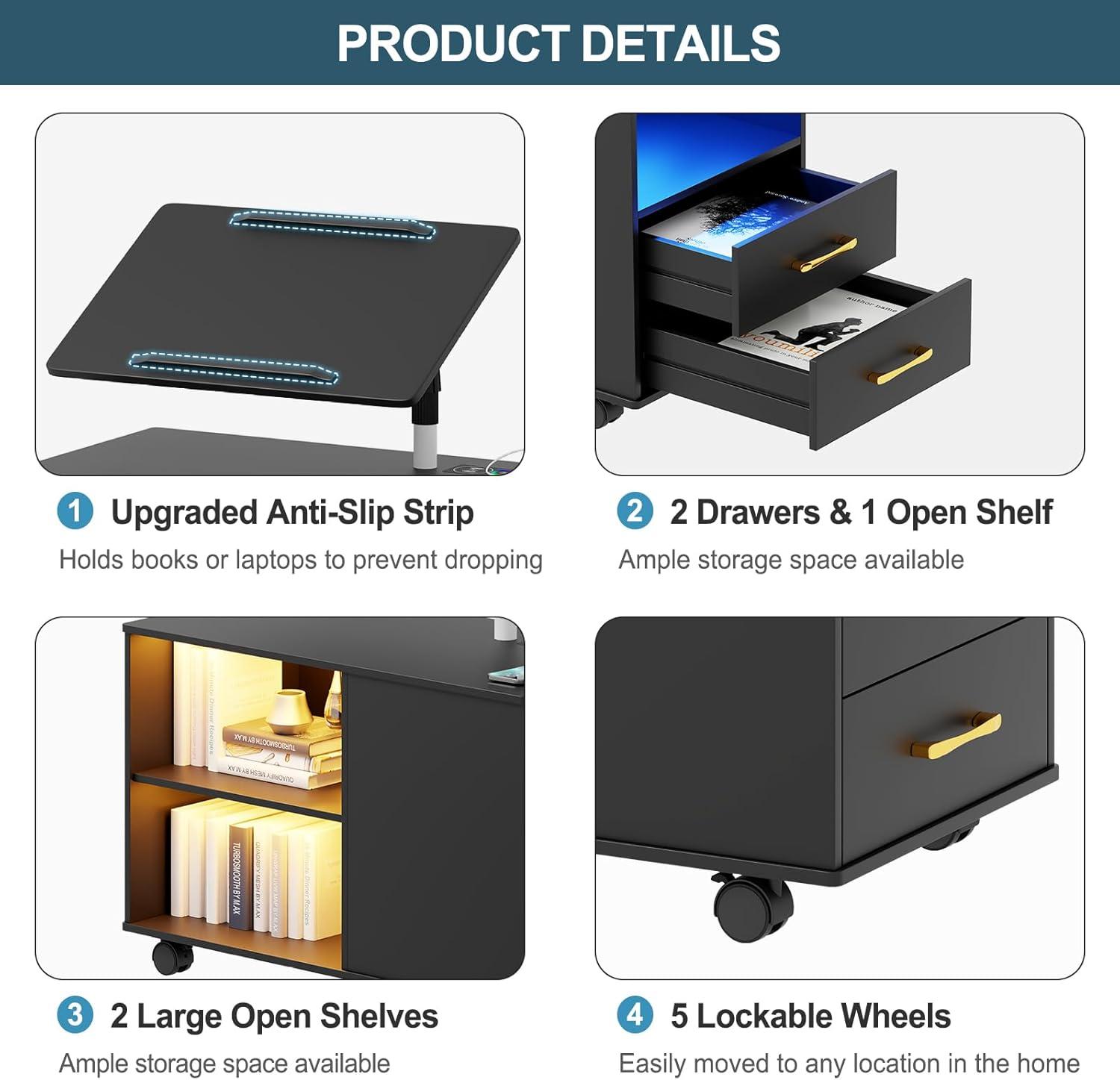
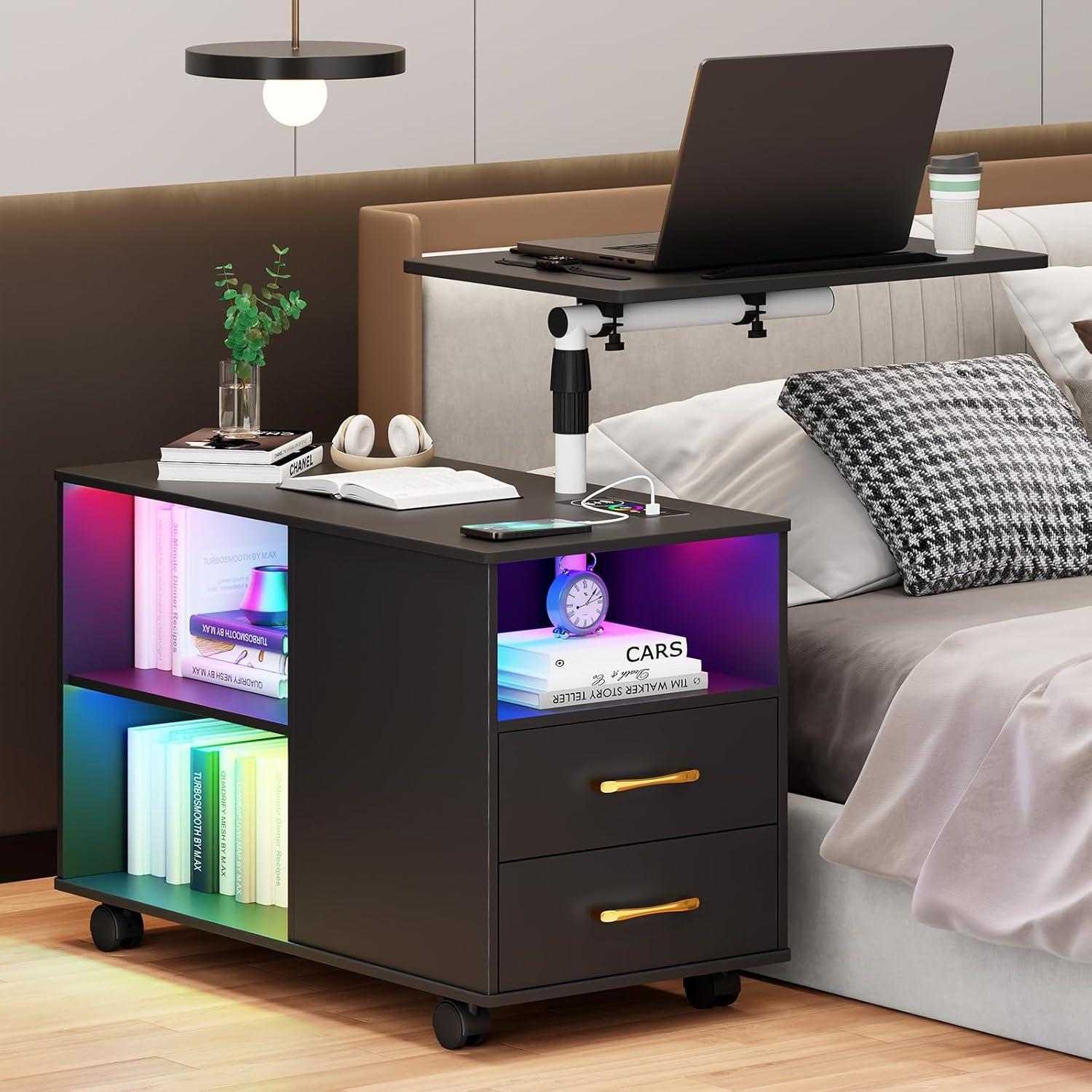
A soft halo of colored light wakes as you step toward the bed, the LED ring shifting through muted tones before settling. Its the Gurexl 360° LED nightstand — in the room it reads as a compact, matte-black block that looks a touch heavier than its footprint suggests. Palm on the tabletop reveals the cool, slightly grained feel of thick MDF; the laptop tray swivels and rises with a solid, notched motion that makes small adjustments feel intentional. Five low-profile casters and their audible locks give it a grounded gait, and the drawers and open cubbies tuck away the everyday jumble so the top can stay deceptively tidy. At night the dimmable light and the wireless pad only stir when you move close, a practical kind of presence rather than something that demands attention.
A first look at the Gurexl three hundred sixty degree LED nightstand and its wireless charging station beside your bed
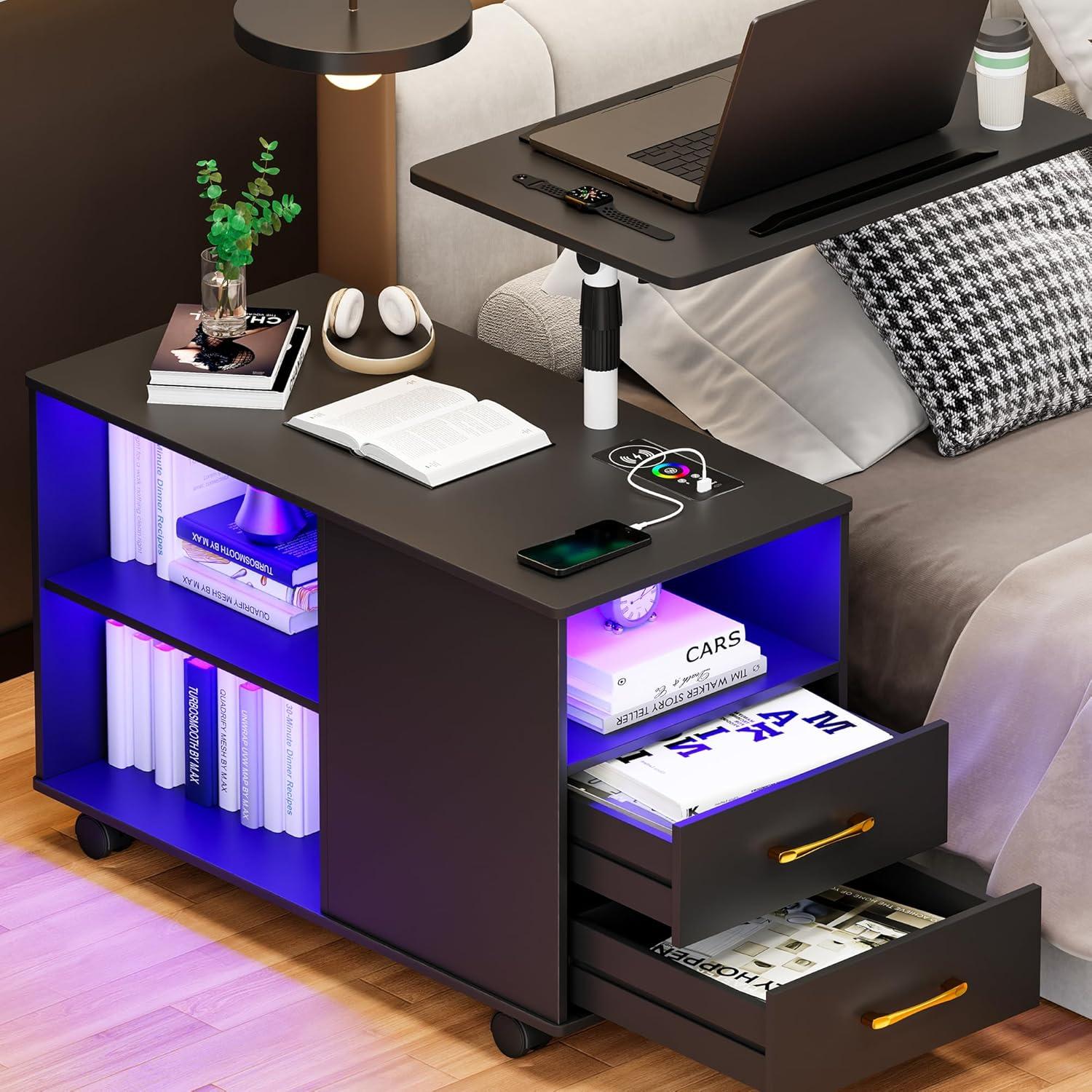
when you roll the nightstand into place beside your bed, the first thing you notice is how it occupies the small gap between mattress and floor — not just as a surface but as an active bedside presence. The top surface sits at a height that lets you set a phone or a book without leaning forward much; the edge of the tabletop comes into view as you lie down, and the LED strip around the perimeter casts a soft halo when it’s activated. Move your hand to reach for the lamp or your phone and the light tends to come on before you fully sit up, a speedy flicker of illumination that makes routines like grabbing glasses or checking the time feel a bit less disruptive to a quite room.
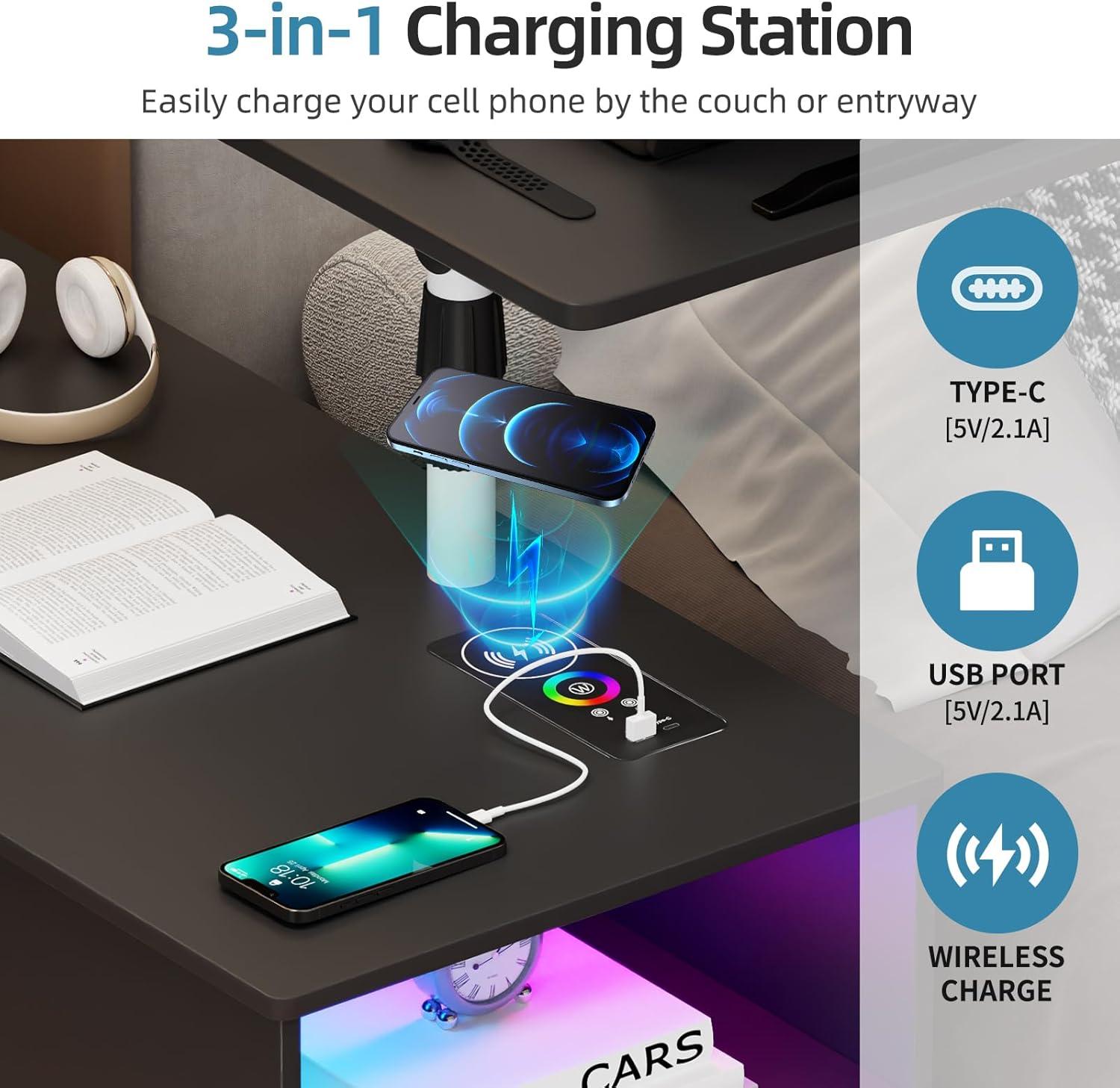
You’ll find the wireless charging pad unobtrusive at first: place your phone on it and the device usually shows the charging icon within seconds, so you don’t have to hunt for a cable in the dark. The tray and surfaces are easy to angle from bed — the rotating top lets you bring a laptop or a book closer without pushing the whole unit away from the mattress — and the wheels mean you can slide the piece slightly toward you if you want a different reach. Drawers and open cubbies peek out from beneath the top, offering a quick stash spot for whatever you reach for in the middle of the night; the overall effect is of a bedside helper that activates around the small, habitual motions you already make.
The black finish, frame, and LED ring up close — what you can see and feel
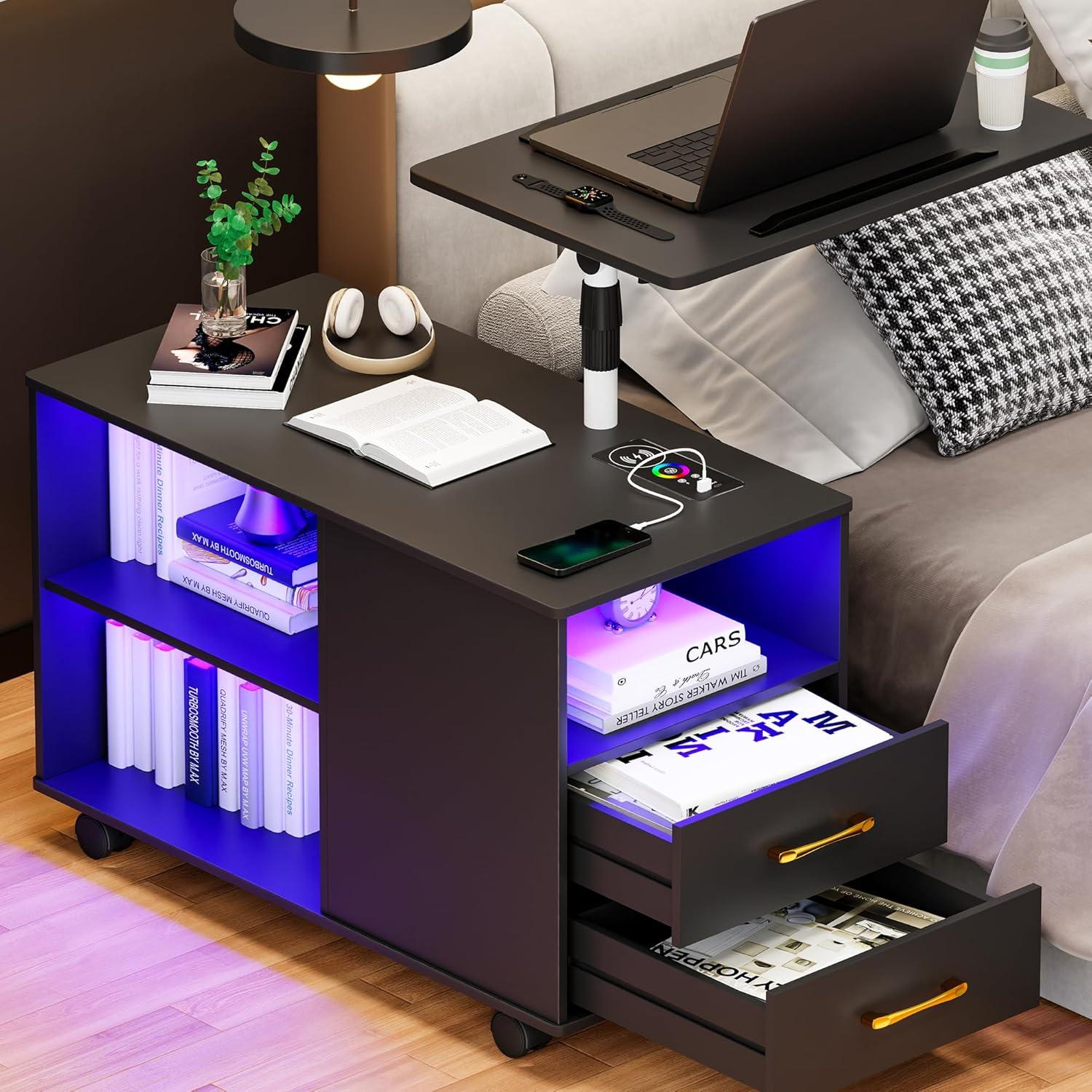
Up close, the black finish reads as a muted satin — not mirror‑gloss, but not fully matte either. From a few feet away the surface looks uniformly deep; when you lean in you notice a subtle micro‑texture and tiny brush marks where paint pooled or thinned at joints. The frame meets the top with narrow seams you can feel if you run a fingertip along the edge; screw heads and fastener lines are visible at certain angles, and the paint tends to show fingerprints and dust more readily than a lighter shade. As you nudge or touch the frame you become aware of slight give at connection points, the kind of small movement that shows where panels meet rather than where a single solid piece would feel.
The LED ring sits as a recessed band around the table surface and invites a closer touch. Its face feels like smooth, slightly yielding plastic — not cold metal — and the joint between ring and top is usually low-profile, with a hairline gap that can catch a fingernail. When the ring is dark it reads as a faint grey line; when it’s lit the light fans outward,creating a soft halo on the adjacent black surface and revealing the ring’s diffuser texture. At lower brightness levels the glow looks even; at higher settings,especially with color changes,you can sometimes make out the individual emitters or slight banding where colors shift. It’s easy to find yourself tracing the seam or resting your palm on that lower lip, noticing how the glow warms the finish beneath it.
| Element | Close‑up impression |
|---|---|
| Black finish | Muted satin, micro‑texture visible, prone to fingerprints and light dust |
| LED ring | Smooth diffuser with subtle seam, even glow at low power, slight banding at high intensity |
How the movable bedside table and the adjustable laptop tray shift, tilt, and lock when you set them
When you wheel the bedside table into place, the five casters let it glide with a modest amount of resistance — not slick, but not sticky either. To stop it, you press down on the little locking tabs with your foot; each lock gives a tactile click and the table settles into place. Even with the locks engaged ther can be a faint, almost imperceptible shift if you bump the lower frame, and you’ll notice yourself nudging it occasionally to line the tabletop up exactly where you want it. keep fingers clear around the wheel housings while you’re setting it down; the mechanism can trap skin if you fuss with a locked caster and the unit is moved.
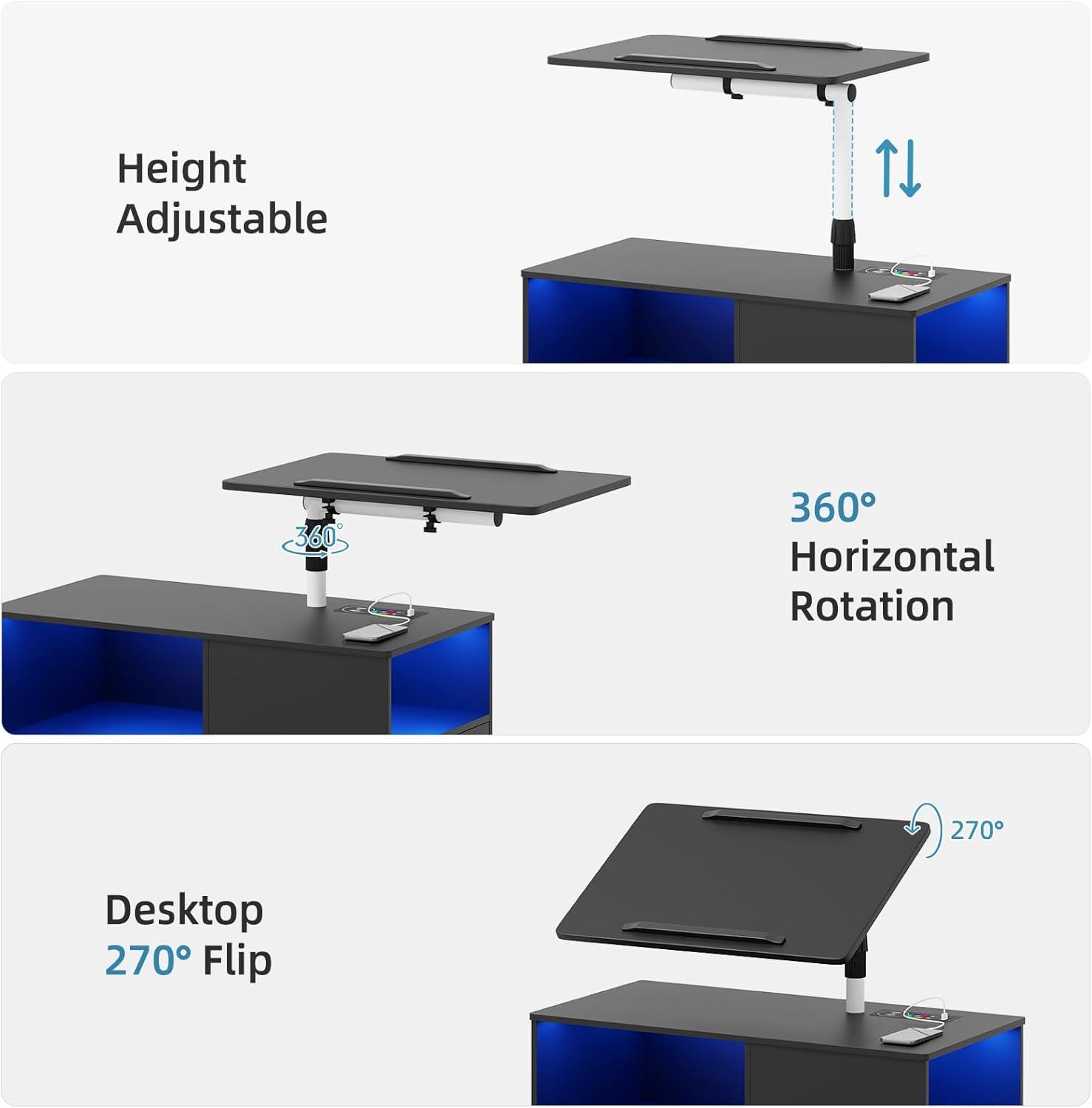
The laptop tray behaves like a small articulating arm. You lift or lower the desktop with one hand and the column slides smoothly, then resists as its internal friction or tightening knob takes effect. Twist or press a control and the tray will stop wherever you leave it; loosen it again and the surface will pivot more freely. The tray spins a full circle around the post and flips through a wide arc so you can turn it toward you, away from you, or tuck it to the side. Tilting the work surface requires the same gesture — free it,set the angle,then secure it — and once locked the tray holds steady in normal use,though heavier laptop movement can make you re-tighten after a day or two of adjustments.
| Movement | How it feels when you set it | How you lock it |
|---|---|---|
| Rolling the base | glides with light resistance; small course corrections needed on soft flooring | Foot-operated caster tabs click down to stop motion |
| Height adjustment (tray) | Slides up/down with one-hand pressure; settles into place with slight friction | Twist or clamp action on the column secures position |
| Rotation & flip | turns smoothly around the post; flips through a wide arc for repositioning | Rotate or flip to desired alignment, then tighten the same control to hold |
| Tilt | Hinge lets you angle the surface; small readjustments feel natural | Locking knob or latch keeps the tilt steady under normal use |
How much floor space and bedside clearance the unit occupies in common bedroom layouts
The unit sits on a five-caster base, so its visible floor footprint is a bit larger than the vertical profile of the bedside surface. Placed flush against a mattress edge, the wheels, lower frame and any drawer fronts occupy the strip of floor promptly beside the bed; when the laptop tray is swung out or raised, the usable clearance in front of the unit extends forward and can encroach into a walking path. Movement and small adjustments — rolling it a few inches, nudging a wheel to lock — are common when arranging it in tighter layouts, so the occupied space can shift slightly over time.
Observed in three common bedroom layouts, the unit behaves differently depending on how much side clearance exists. In narrow gaps it tends to fill most of the available space, with wheel access and drawer operation becoming the limiting factors.In a standard bedside arrangement there is usually enough room for drawer access and a partially extended tray without blocking a typical walkway. In open-plan or larger rooms, the unit sits well clear of traffic paths and its rotation and height adjustments can be used without moving other furniture.
| Layout | Typical gap (approx.) | Observed effect on clearance |
|---|---|---|
| Narrow side | ~12–18 inches | unit occupies most of the gap; wheel locks and drawers are harder to access; tray rotation may extend into the bed or walkway. |
| Standard bedside | ~18–30 inches | Room to roll the unit slightly, open drawers, and use the tray with moderate clearance from the bed and path. |
| Open / walk-through | 30+ inches | Unit sits with clear perimeter for rolling and swinging the tray; adjustments are possible without repositioning other pieces. |
These ranges are observational and can vary with mattress overhang, bed frame thickness, and how far the tray is angled or raised during use.
view full specifications and size options
A night and a workday with the auto sensor,LED modes,and wireless charging pad in action
Night
When you slide into bed, the auto sensor is likely to catch the small motion of your hand or foot before you reach the bedside, and the LED strip wakes up in a gradual, low-key way. One of the color modes usually offers a muted warm tone that reads as a soft backlight rather than a direct lamp; other modes bring cooler or more saturated hues that feel more like accent lighting than task light.If you reach for your phone on the top surface, the wireless pad begins charging with only a mild glow from its indicator; the phone settles in place without having to fuss with connectors. In practice the brightest LED setting can feel surprisingly direct for late-night tasks, while the dimmer settings tend to stay unobtrusive and let you find things without switching on a stronger light. Small movements from the bedside—shifting blankets or crossing a foot—sometimes trigger the sensor, so the lights can flick on and off as you settle in, but that tends to happen less once you’re still.
Workday
During the day the auto sensor behaves differently: it may not respond to you walking past in bright ambient light, and the LED colors show up more as a tinge around the edges than as a source of illumination. When you pull the table in for a mid-morning laptop session, the wireless pad continues charging a phone at the ready; you’ll notice the charging indicator is easier to see when you glance down than the LEDs from across the room. If you pause and lean away for a break, the lights commonly switch down or off after a brief idle period, which keeps the workspace from staying lit unnecessarily. The wireless pad sometimes requires a small nudge to center a phone—misalignment can cause charging to drop in and out during heavier use—and the pad can feel slightly warm during continuous charging, which is a normal observed behavior rather than an outright malfunction.
| Moment | Sensor Response | LED Visibility | Wireless Pad Behavior |
|---|---|---|---|
| Night (low light) | Generally responsive to small motions | Clear; dim modes are subtle,bright modes are direct | Charges quietly; indicator ring visible |
| Workday (bright light) | Less likely to trigger from a distance | Appears as ambient tint rather than primary light | Charges reliably if phone is centered; may get warm |
How it measures up to your expectations and where it might be limited for your setup
In everyday use the unit mostly behaves like a compact, mobile workspace: it rolls smoothly across hard floors, the surface and drawers handle routine items without obvious strain, and the adjustable tray moves through its range with little fuss. The motion sensor reliably brings the LED ring to life at close range, and the charging pad works when devices sit near its center—though phones often get nudged slightly to find the sweet spot, a small habitual realignment that happens during typical bedside routines. The rotating tray and height adjustments perform as was to be expected for short sessions, and the drawers/open compartments generally keep bedside clutter contained rather than spilling into sightlines.
Certain trade-offs become apparent depending on room layout and habits. on plush carpet the casters can feel sluggish; on very smooth floors they tend to keep rolling until the locks are firmly engaged,so movement can be more pronounced than initially anticipated. When the laptop tray is extended toward the edge of its travel, the top can take on a mild wobble if weight is placed off-center, and the tension on pivot points may need occasional readjusting after repeated angle changes. The motion-sensing lights sometimes activate with brief passersby in a hallway or when someone shifts in bed, and wireless charging can generate low-level warmth and slower fill rates if a device isn’t aligned precisely. Over time, small fittings may loosen in some setups, producing creaks or the need for a quick tighten during routine use; these behaviors tend to show up gradually rather than immediately.
View full specifications and available options
what unpacking, assembly, and routine upkeep involve in your space
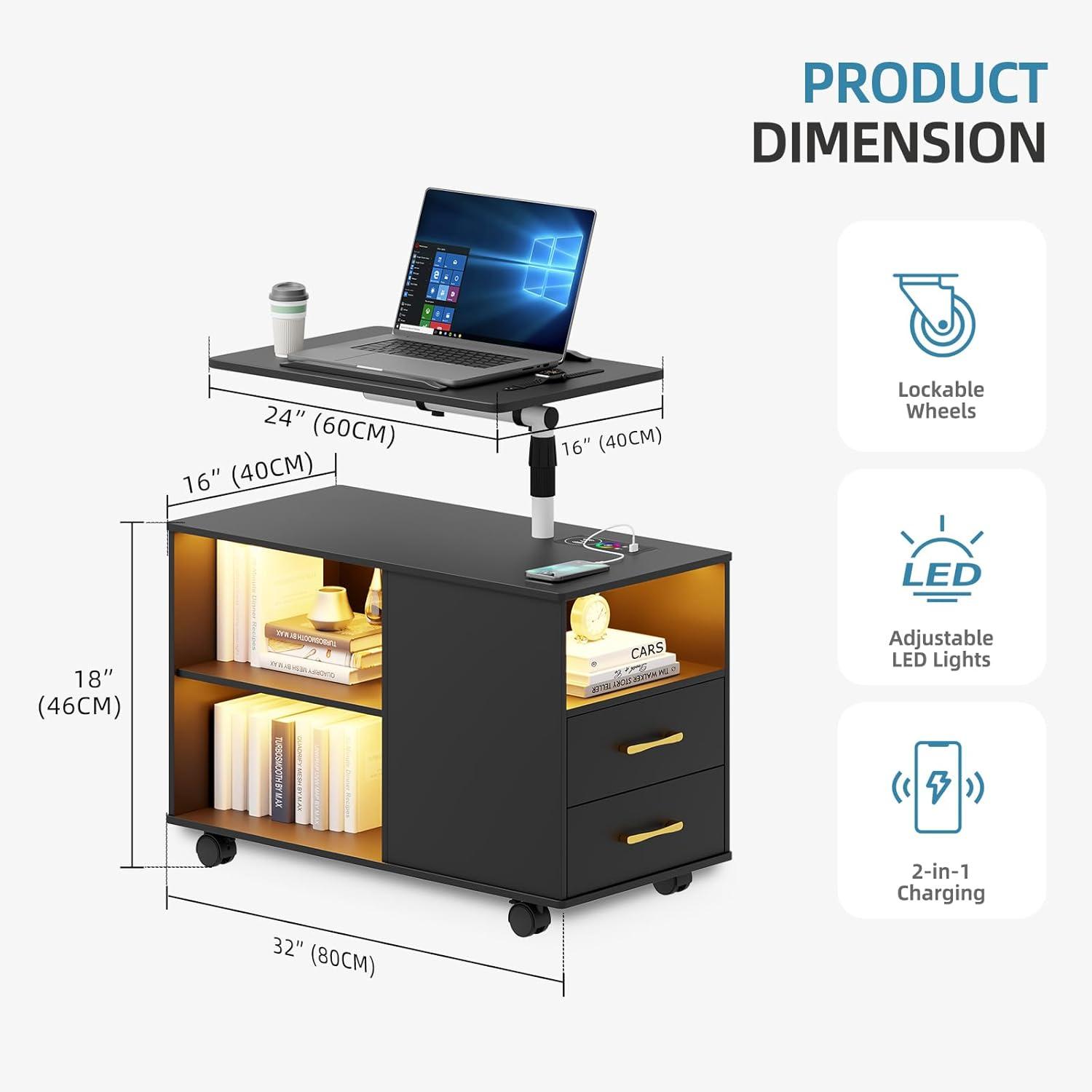
When the box arrives, you’ll notice a handful of flat-packed panels, a small hardware bag, five caster wheels, and the larger movable desktop and tray pieces. The carton feels dense rather than bulky; opening it on the floor and sliding parts onto a soft surface keeps the MDF edges from catching. Small parts are usually grouped in one plastic pouch — you’ll habitually check that pouch before you start so you don’t pause mid-build. A printed sticker or note on one of the boards mentions the maximum tabletop load of 200 pounds,and the wheels have exposed mounting brackets where fingers can catch if you lift or roll parts carelessly.
Assembly tends to be a hands-on, stepwise affair. You’ll lay out panels, mount the casters, mate the tray mechanism to the uprights, and fasten a few cross pieces; an Allen key is usually in the packet, but a Phillips screwdriver and a short socket or adjustable wrench make some steps quicker. As you line things up you’ll be nudging panels into place, feeling for slight play and then tightening fasteners until the surfaces sit flush. The lockable wheels click as you roll the unit into position; you’ll check that the base sits level and that the laptop tray moves and flips without scraping. It’s common to re-tighten a couple of bolts after a day or two once the pieces have settled.
In everyday upkeep you’ll find simple, familiar habits emerge. The tabletop and tray collect dust, fingerprints, and crumbs; a soft cloth wiped across the finish quickly restores an even look, while the charging pad shows smudges more readily. The LED strip and sensor respond when you approach, so you may brush at the sensor or wipe the light diffuser from time to time to keep the motion activation reliable. Wheels trap pet hair and lint in most homes; running a hand over them and freeing the casters keeps movement smooth. Drawers and slides glide with a little give after regular use,and periodic checks of screws and caster locks tend to keep the whole unit feeling snug.
| Task | Typical time | Common tools |
|---|---|---|
| Unpacking and layout | 5–15 minutes | None (soft surface recommended) |
| Full assembly (one person) | 30–60 minutes | Allen key (often included), Phillips screwdriver, small wrench |
| Routine upkeep (weekly) | 5–15 minutes | Soft cloth, occasional brush for casters |
How It Lives in the Space
After a few weeks and then months, you notice the Gurexl 360° LED Nightstand with Wireless Charging Station, Movable Adjustable Bedside Table with Laptop Tray, Auto Sensor Night Stand for Bedroom (Black) settling into routines rather than standing out. In daily rhythms it becomes the spot where your phone, a book, a glass of water leave their small traces, the surface picking up faint scuffs and the edges softening with use. You find it behaving as part of comfort—within easy reach for late reading, shifting position as the room is used for work or rest—and those small habits make it feel familiar. Over time it simply stays, rests, and becomes part of the room.
As an Amazon Associate I earn from qualifying purchases.